Guide
How to Batch Convert MSG to PDF on Windows
Updated SoftOrbits
Quick answer:
- A folder of saved emails, with or without Outlook: a desktop converter turns each .msg into a separate PDF or one combined file
- A few emails and classic Outlook on the PC: open each .msg, choose File > Print and pick Microsoft Print to PDF
- Outlook and Word installed and you are comfortable with scripts: a PowerShell loop saves each message as a PDF through Word
In this guide
- Batch convert MSG to PDF for a whole folder in one run, no Outlook needed
- Print single messages to PDF from Outlook for free
- Script the job with PowerShell, Outlook and Word
What you need
- MSG to PDF Converter for the batch route, on Windows 10 or 11
- A folder of saved .msg files (subfolders are fine)
- Classic Outlook, only if you take the free manual route
- About 10 minutes for setup and a test run
How to convert a folder of MSG files to PDF without Outlook
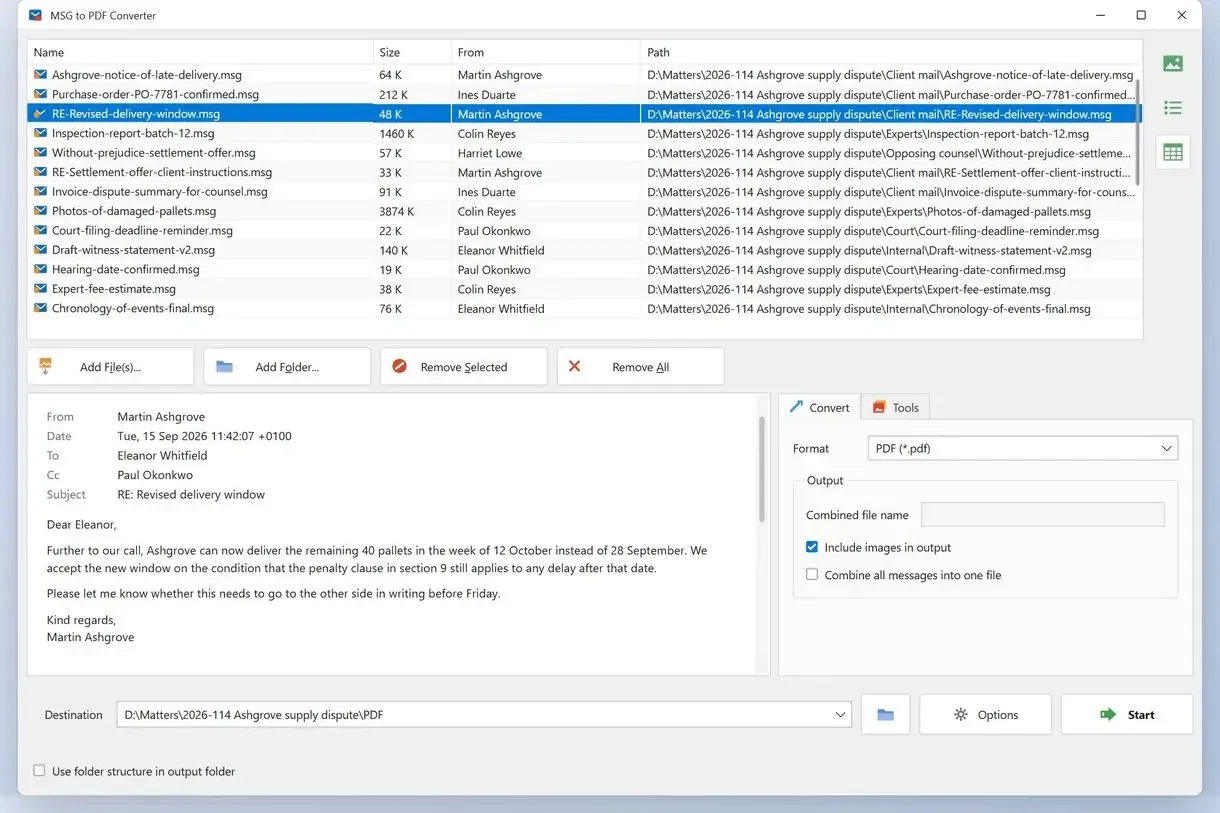
MSG to PDF Converter reads saved .msg files from disk without Outlook installed or running. To batch convert MSG to PDF, add a folder, pick PDF, choose one PDF per email or one combined file, and click Start. The free trial converts 3 emails a day so you can check the output before a big run.
Microsoft documents how Outlook stores a message in the Outlook Item (.msg) File Format. The program decodes it on your PC.
Add the top folder of an archive sorted by year or client to include its subfolders in one queue. Choose PDF, or HTML for a web copy. Each PDF has From, Date, To and Subject lines above the body. The date retains the sender's time offset, and messages keep their Outlook HTML layout.
The program converts one message at a time on a single worker. Leave a folder of several hundred emails running while you do something else.
By hand in Outlook
- Open each .msg and print it to PDF
- Type a file name for every message
- Repeat for every subfolder
With MSG to PDF Converter
- Add the top folder once
- Pick one PDF per email or one combined PDF
- Click Start and open the output folder
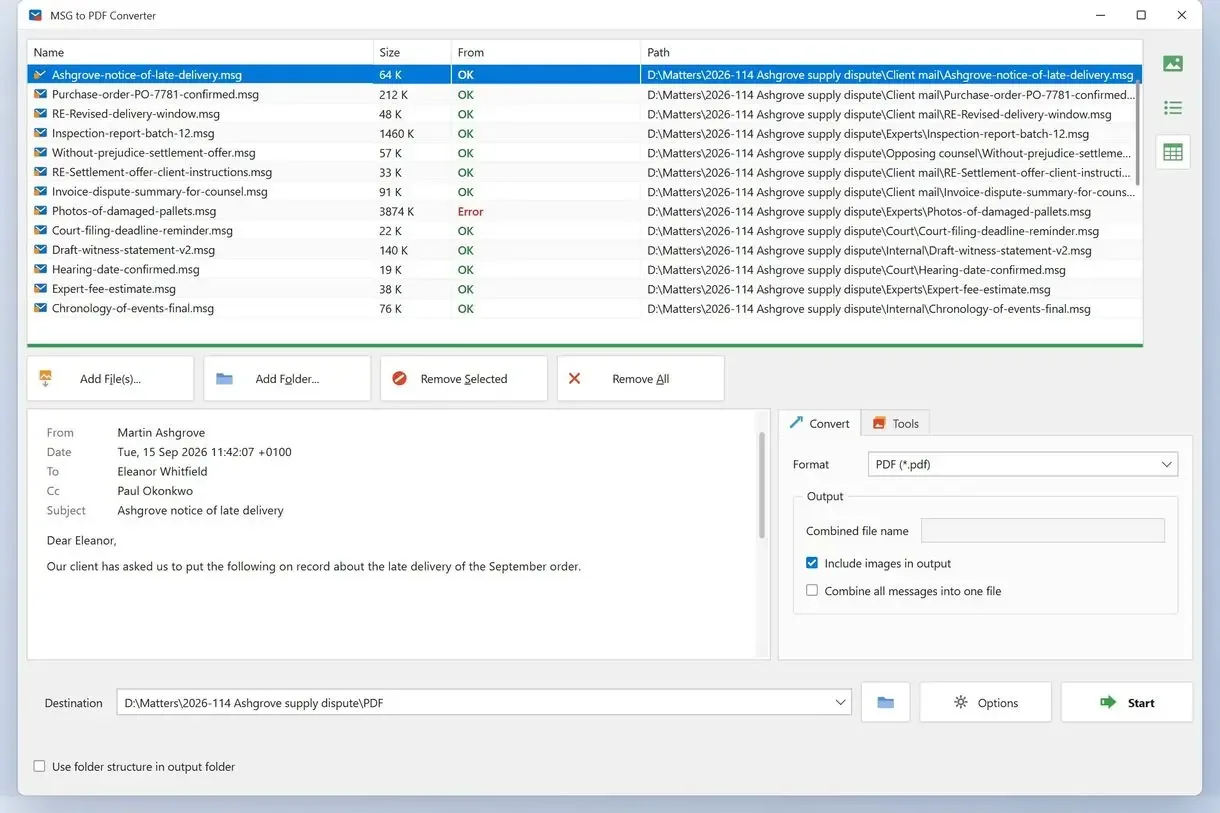
Convert MSG files to PDF in three steps
Add the folder with your MSG files
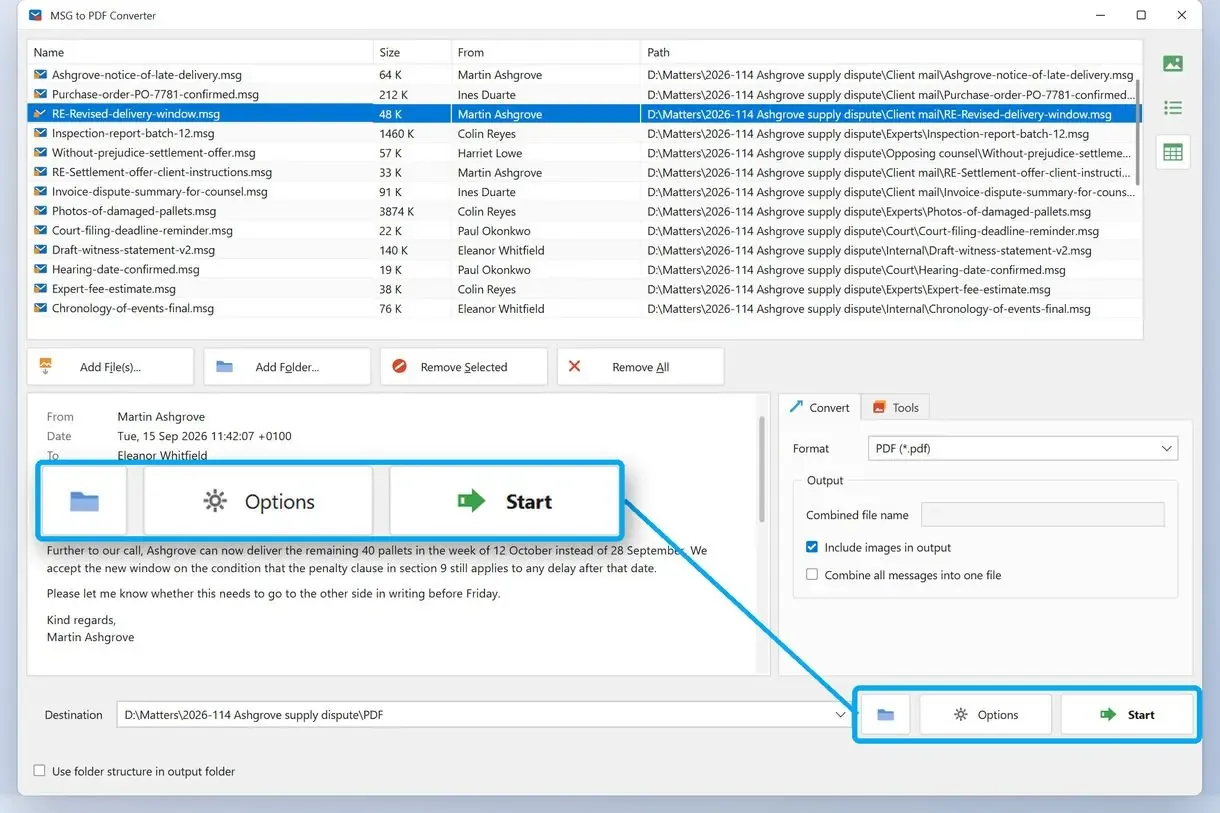
Install the program, click Add Folder and navigate to the desired location, or drag the folder onto the window. You will see that the files will start loading immediately, including subfolders; wait for all the files to appear in the list.
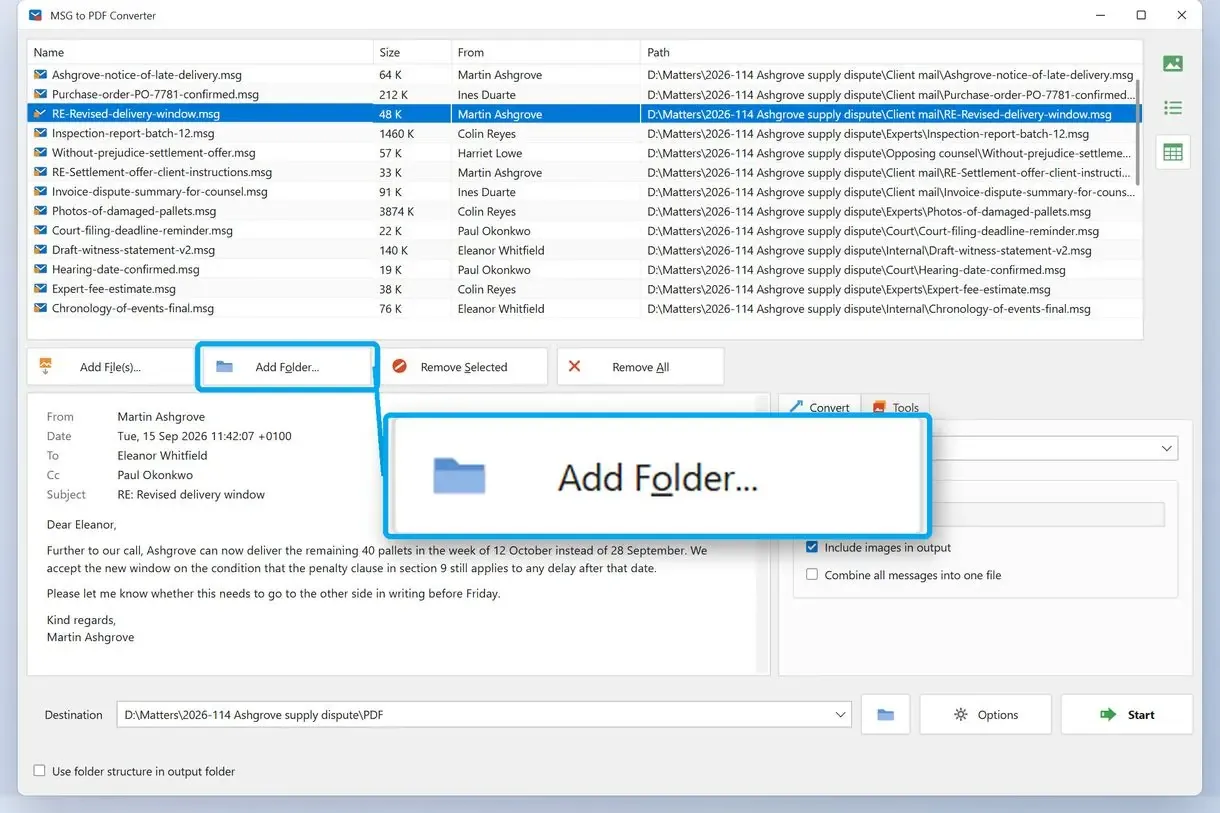
Choose PDF and one file or many
On the Convert tab, select PDF. Choose one PDF per email or one combined PDF for the queue, and tick or clear the option to include images.
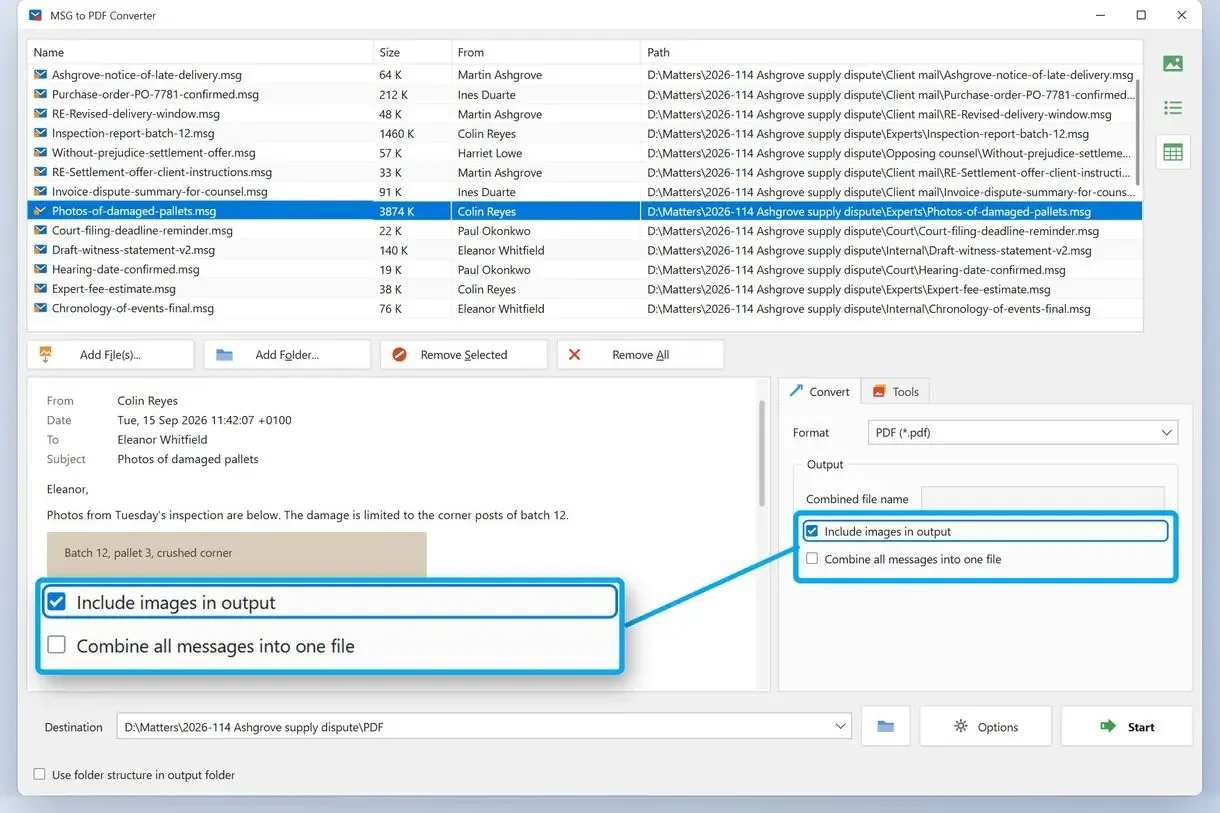
Pick a destination folder and click Start
Choose a destination folder for the output files. Click Start after making the selections, and open that folder when the run ends.
One combined PDF or a separate PDF for every email?
Choose separate PDFs for messages you file, share or delete individually. One combined PDF suits a case file or audit request that someone reads from top to bottom. Messages appear in file list order.
Ask whoever requested the PDFs. A records team wants each message beside its invoice or contract; a lawyer or auditor often wants one document to read and annotate. Staff at one law firm tried merging case emails with a general PDF tool. It stopped with an error because it did not support .msg.
Sort the list in the order the reader expects before clicking Start. A divider separates messages in the combined PDF. You can run a folder twice, depending on your requirements: separate files for the archive and one combined PDF to send.
How to convert MSG to PDF in Outlook with Print to PDF
In classic Outlook, use File > Print and Microsoft Print to PDF to convert one saved .msg for free. Each message needs its own print job and file name.
- Double-click the .msg file to open an Outlook message window
- Choose File > Print
- Select Microsoft Print to PDF and click Print
- Type a file name, pick a folder and click Save
For a message still in your mailbox, save an Outlook email as a PDF.
Where does the manual route break?
Outlook has no built-in batch print for .msg files. Converter vendors' how-to pages also say their manual method needs Outlook and handles one file per run. Outlook archiving is a limited workaround: in one office, it handled only msg files without attachments. Five emails are manageable by hand. Five hundred mean a day of clicking.
Why won't Adobe Acrobat convert MSG files in a batch?
Acrobat rejects saved .msg files dragged into Combine Files. Its PDFMaker add-in converts mail inside Outlook, so you must put saved files into an Outlook folder first.
If you are still finding it difficult in Acrobat, one owner checked its supported formats and found .msg missing. Forum answers usually recommend dragging the .msg files into an Outlook folder and converting that folder with the Acrobat add-in.
Large selections can fail too. One user said the add-in handled hundreds of messages in January, but by late July it converted only the first selected message and skipped the remaining 400+ files.
Converter vendors say "no Outlook needed", while forums send you back to Outlook. They describe files in different places: Acrobat's add-in and Outlook's own tools work with mail inside an Outlook folder. Import saved .msg files first.
How to batch convert MSG files to PDF with PowerShell
With classic Outlook and Word installed, a PowerShell loop can open each .msg, save HTML and export a PDF through Word. The script costs nothing but needs both desktop apps, and Word can change the layout.
Outlook's NameSpace.OpenSharedItem method opens a saved .msg. Outlook cannot save directly to PDF, so the script passes HTML to Word. The folder in our example is C:\Mail. Change the path and run the script on a copy of your folder.
$outlook = New-Object -ComObject Outlook.Application
$word = New-Object -ComObject Word.Application
Get-ChildItem "C:\Mail" -Filter *.msg -Recurse | ForEach-Object {
  $mail = $outlook.Session.OpenSharedItem($_.FullName)
  $html = [IO.Path]::ChangeExtension($_.FullName, ".html")
  $mail.SaveAs($html, 5)
  $doc = $word.Documents.Open($html)
  $doc.SaveAs2([IO.Path]::ChangeExtension($_.FullName, ".pdf"), 17)
  $doc.Close()
  $mail.Close(1)
}
$word.Quit()
Here, 5 is Outlook's HTML save type and 17 is Word's PDF format code. Each PDF keeps its .msg file's name and sits beside it. The HTML copies remain there; delete them after checking the PDFs. Word rebuilds the page from HTML, which can change how wide tables and some signatures wrap.
What happens to attachments when you convert MSG to PDF?
Print to PDF shows attachments as names or icons that you cannot open from the PDF. When you batch convert MSG to PDF with attachments, the current release of the converter lists attachment names so you can see what came with each email.
The common advice for Outlook says printing flattens attachments into text/icons on the page. Printing attachments individually is slow: one reader had to type a new file name for each attachment the printer saved.
A logo or screenshot pasted into the message body is stored as an inline part referenced by a cid: link (RFC 2392). The program's include images option controls whether these pictures appear. Leave it on for newsletters and screenshots, or turn it off for smaller text archives.
Keep the .msg folder after converting. PDFs are reading copies; Outlook can reopen the .msg files with their attachments.
How do you keep the original MSG file names?
Outlook's Print to PDF requires you to type a name each time. The PowerShell loop keeps each .msg file's name. In the program, Rename on the Tools tab adds a prefix or suffix. Check a few output names before converting the whole archive.
Archive names can contain a case number, date or sender. One person converting hundreds of .msg files found that the PDF names no longer matched. Another got files named Memo Style.pdf and renamed each by hand.
Use Rename on the Tools tab to tag a batch with a matter number, for example, so PDFs from two runs do not mix in a shared folder.
Why do some MSG files fail with "Not an email message"?
A genuine .msg is an Outlook compound file. Some archives have plain-text emails or HTML pages with a .msg extension. Strict tools can reject these with "Not an email message".
Someone running a large batch saw messages skipped with that status and received no list of failures. A genuine .msg uses a Compound File Binary container, the same family as old .doc files. Other mail systems sometimes export plain-text emails in RFC 822 message format and rename them to .msg.
The program checks the contents. It converts plain-text emails saved as .msg through its email path, but rejects HTML pages with that extension. Unreadable files get an error in the file list so you can identify failures.
Is there a free way to convert MSG files to PDF in bulk?
Outlook's Print to PDF converts MSG to PDF free for individual messages. The PowerShell loop is free with Outlook and Word installed. Desktop converters offer capped trials.
The count resets daily. The trial will not clear a backlog of thousands.
Paid converters make different claims about folder structure, naming rules and attachments. Test those claims on your own folder: a demo shows only the first few files.
MSG to PDF free online: is it safe for work email?
An online converter uploads every message to someone else's server. Check your company's data policy before uploading client mail, HR records or anything under a legal hold. A desktop converter keeps files on your PC throughout.
Which way fits your MSG folder?
Choose by folder size and installed software. Use the desktop converter for hundreds of saved files without Outlook, or Outlook's Print to PDF for a handful of messages.
| Method | Whole folder in one run | One combined PDF | Needs Outlook | Cost |
|---|---|---|---|---|
| MSG to PDF Converter | Yes, subfolders included | Yes | No | Trial: 3 emails a day |
| Outlook Print to PDF | No, one message per print job | No | Yes, classic Outlook | Free |
| PowerShell loop | Yes | No, one PDF per .msg | Yes, plus Word | Free |
- Hundreds of .msg files on a shared drive without Outlook: MSG to PDF Converter, one PDF per email
- Legal or audit request: a combined PDF, sorted first
- Fewer than ten messages with classic Outlook: File > Print and Microsoft Print to PDF
- Office on every PC and comfort with scripts: the PowerShell loop, tested on a copy
- Saved .eml files: the separate EML to PDF Converter
For mail still in a mailbox, export Outlook emails to PDF.
Compare single-file methods to convert MSG to PDF.
Test a few files and open the PDFs with complete details in view. Check layout, names and dates, including the sender, date and subject above the body and the attachment names.
Sources
- PDF on Wikipedia - background on the output document format
FAQ
How to convert multiple MSG files to PDF at once?
Add a folder to MSG to PDF Converter, choose PDF and separate or combined output, and click Start. Outlook prints one message per job.
Can I batch convert MSG to PDF with attachments?
Inline pictures appear in the message; attached files appear by name. Keep the .msg files to open attachments later.
Can Adobe Acrobat convert MSG to PDF?
Use Acrobat's PDFMaker add-in inside Outlook. Import saved .msg files into an Outlook folder first.
Can I convert MSG to PDF online?
Several sites accept .msg uploads. Each email goes to their server, so check company policy for client, HR or legal mail.
How do I convert an Outlook email MSG to PDF?
To save one email message to PDF, open the .msg in Outlook, choose File > Print, select Microsoft Print to PDF and save. For a folder, use a batch program or script.
Can you convert EML or MSG to PDF?
Use MSG to PDF Converter for Outlook .msg files or EML to PDF Converter for .eml files from other mail programs.
Can Outlook save many emails as PDF in one go?
Classic Outlook has no built-in batch save to PDF. Each print job handles one message and flattens attachments into names or icons.
How many emails does the MSG to PDF Converter trial convert?
3 emails a day, resetting the next day. A license removes the daily cap.
Convert your saved Outlook emails to PDF on Windows.